|
THE SPORTS HQ HAS ARRIVED
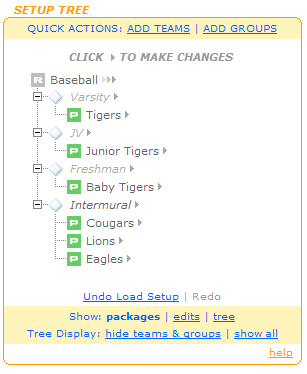
The Sport HQ is the new, easier way to setup a website for your League, School or other Sports Organization. Now, if you want to add or change your teams, or arrange them into groups, you can edit them using the Sports HQ Setup Tree; just click on the team or group on your Setup Tree and you'll have options to rename, move, insert, change your packages. You can even save "checkpoints" to compare different setups in the Sports HQ.
The first release of the Sports HQ includes everything for Organizations with one sport to setup their sites. We will be releasing an update in the coming months to allow Multi-Sport Organizations to manage their websites from one Sports HQ. If you currently have a setup with several different sports they will each have their own Setup Tree.
The Sports HQ has replaced the current "League Structure" feature and the "Package Selection" page.
EASIER PRICING
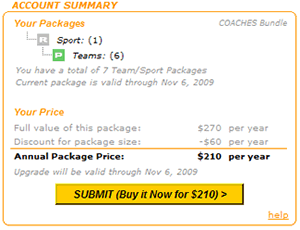
The Sport HQ is also where you can view your Account status and compare pricing options. The current packages (ROOKIE, PRO-STYLE, ALL-STAR and CHAMPION) are still exactly the same for your TEAM and SPORT websites. The new pricing is designed to simplify the pricing for websites with more than one TEAM.
The new pricing calculates the full value of your setup (based on the current single team package prices) and then shows your discounted price - the larger your setup and more advanced packages you buy, the better your discount.
We want to be sure our customers continue to get the perfect setup at a great price. In many cases the price to renew will be less - and you can enjoy the savings. If the renewal price for your present setup is higher, just contact us and we will apply a special discount to keep your price the same.
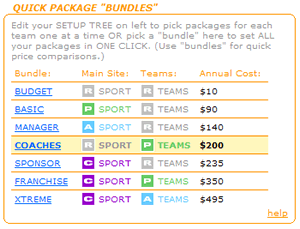
PACKAGE "BUNDLES"
The Sports HQ also has a selection of website package "bundles" so you can pick all the packages for your TEAMS and SPORT in one click. We have bundles ranging from "Budget" up to "Xtreme" so you can easily view and compare prices for your setup.
|
NEW PASSWORD FEATURE
HomeTeamsONLINE users can now customize password security for specific pages. In addition to setting password protection on or off for the entire site, you can now customize selected pages to allow access to a special group with their own password (coaches, players, etc.).
  
With this new password feature you can hide information that you don't wish "scouts" from your competition to view, such as statistics or practices. You could also allow a particular page, such as the home page, to be viewed by the public while keeping the rest of the site password protected.
You can use the ability to set up your own special access groups to give passwords to coaches, players or staff for specific pages that only they are allowed to view. The new password options has replaced the visitor password pop-up feature.

GET THE MOST OUT OF YOUR SITE
Our development team is always adding exciting new flexibility and options to the site. Check out the new "Recent Updates" in the help tool at the bottom of every admin page. We encourage you to discuss your ideas with other members in the Sports Ramble. Also don't be shy to contact our friendly support team to see if we can help make your ideas a reality.
USE THE NEW FEATURES TODAY
The NEW Sports HQ and Password features are available when you click on existing navigation links and buttons for that item.
|

