Print this page out for easy reference.
Preparing for the season:
1. Check out the League Information section.
2. Print out the LA Baseball League Rules, be familiar with them, and keep them with you for all games.
3. Print out the Manager & player responsibilities on fields, know them and make sure your players know them.
4. All players must register (including the manager) with the league and have all necessary waivers sent in. Players will not appear on the website roster or be eligible to play as a rostered player in games until they have registered, sent in any necessary waivers and are on the league's online roster page for each team. Each player must fill out these forms, making sure that each player is aware of the conditions set forth by the league. Only accurate information…..bogus info does the league zero good and will be flagged and those player registrations will be voided.
Forms that must be filled out completely:
2026 Online Player Registration Form / all players must register for their team before participating in any league game or event.
Before each game:
- bring umpire fees of $130 per team per game.
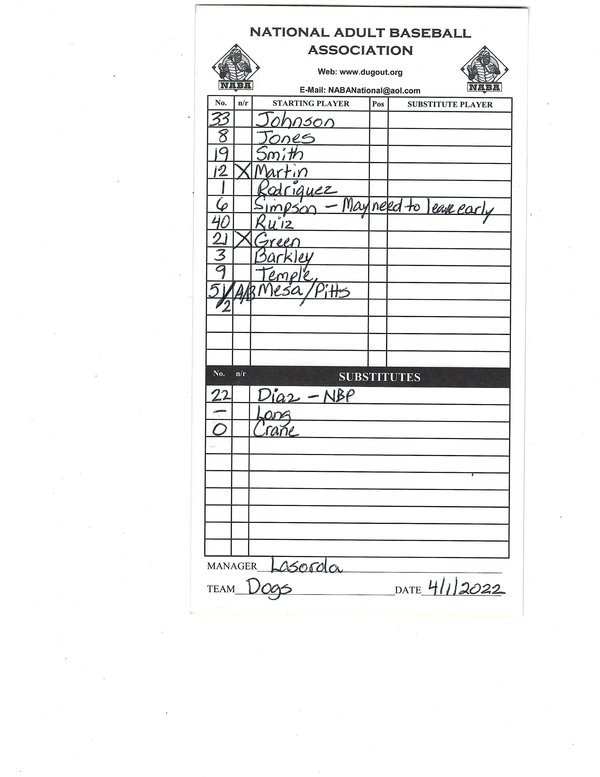
- bring a line-up card and fill it out correctly. Last name of all players, numbers, non-runners, A/B batters, not batting pitchers (NBP), all substitutes. HERE IS A SAMPLE LINEUP CARD.
- bring your scorebook & keep a book (minimum - your hitters and pitchers game stats must be kept).
- bring a game sheet if you are the home team.
- bring at least three (3) brand new league supplied or league approved baseballs.
- bring any equipment that you supply.
- always have all of your player contact info with you in case needed.
- check the league Facebook page and website for any game day updates (weather, fire, traffic, etc.).
- You should be given field info (permits, who to contact, etc.) for each venue by Friday of each week with info. Read that material, but should you still have problems, text league manager Will Diaz @ 213-219-8508 if you encounter any on field issues (locked gates, locked restrooms, field problems, no umpires, etc.).
At the game:
- The home team always shall occupy the 3rd base dugout with a few exceptions (check the rules for your division), except in the case of a double-header, other arrangements may be made.
- The home team will provide a game sheet. All participants for the home team and visiting team will print and sign their names in the appropriate spot before the game. Then the home team manager will have the umpires sign the game sheet. The home team will then be responsible for keeping the official game score and after the game getting a copy of the game sheet to Will Diaz as soon as possible.
- The game will not begin until both teams and umpires have signed the game sheet.
- Umpire / manager meeting: bring completed game sheet, 3 new league balls, $130 umpire fees, line-up cards.
- Lineup cards: List all player's last names and numbers. List your batting order, which will include all non-runner batters (needing a courtesy runner), pool players, A/B batters, non-batting pitchers (NBP), and all reserve players (including non-runner batters).
- You should be given field info (permits, who to contact, etc.) for each venue by Friday of each week with info. Read that material, but should you still have problems, text league manager Will Diaz @ 213-219-8508 if you encounter any on field issues (locked gates, locked restrooms, field problems, no umpires, etc.).
- After games end please make sure the dugout is clean, even if your team did not make the mess.
After each game - These are all mandatory:
1. File a field condition / umpire evaluation report. This will help us keep current on field conditions and grade umpires.
2. Input the game score, summaries and boxscore.
3. If you used any pool players, you must send Will Diaz ([email protected]) an email with those player's names.
4. If you had players that you put in the boxscore with all zeroes (No plate appearances or innings pitched) you must send Will Diaz ([email protected]) an email with an explanation as to the circumstances (example: player is a relief pitcher who was at the game but didn't get in; or, an injured player came to the game and stayed to coach 3rd base for the whole game).
5. MOST IMPORTANTLY: Home team manager must send completed copies of the game sheets signed by both managers and umpires to Will Diaz via email or text. When sending, please include team name and game date in the file name.
Follow this step by step procedure to enter your game stats...it is very easy to do, and takes about 7 minutes.
To input your team stats (which is a weekly requirement), you need to do the following (step by step) ....
1. Click on “Stat Login”
2. Click on “Sign In”
3. You should see … “You're signing in to League Lineup Admin”
4. MOST IMPORTANT / VERY IMPORTANT … it asks for email address … USE YOUR EMAIL ADDRESS (or manager's email address).
5. Enter the Password given to the manager in the login email.
6. Click “Sign On”
STAT INPUT
Click the Scores tab and fill in the scores per inning and the final Runs Hits Errors for your team and/or both teams if you are the first to input.
Click on the Game Notes tab and move the cursor to the blank white editor section. From there you can type in the highlights of the game and any write up of the game itself.
Click on the Stats tab next to the Scores tab and click on the batting (if not already up) tab. All of your rostered players should be listed. From there, here is the step by step to input your team stats:
1. Under the Line Up column, you will enter all the players that played or were eligible for a game played and put the position in the lineup that they hit. Example: Your lead off hitter is 1, your clean up hitter is 4, a pitcher that didn't bat would be the last number in your lineup ... maybe 12,13 or whatever.
2. Under the G (Game played) column, you will check if that player is eligible for a game played.
3. Fill in the stats for all players. You do not have to put a zero (0) for anything that has no stats.
4. Once finished with all the batting stats, click on the save button at the bottom of the roster of players .... VERY IMPORTANT, or it will not save your work.
Go to the pitching tab .... VERY IMPORTANT, if no players show then you will need to click the Show All Positions tab at the bottom of the roster. This will show your roster.
1. Under the ORDER column, you will enter the order in which pitchers appeared.
2. Under the G column, you will check if that player pitched.
3. Under the GS column, you will check if that player started the game on the mound (starters will also have the G column checked).
4. Check the W (winning pitcher), L (losing pitcher) or SV (earned a save) column for the appropriate pitcher.
5. Under the INN column, use the drop down menu to enter the amount of innings pitched.
6. Fill in the stats (H, R, ER, BB, HBP, SO) for all your pitchers. You do not have to put a zero (0) for anything that has no stats.
7. Once finished with all the pitching stats, click on the save button at the bottom of the roster of players .... VERY IMPORTANT, or it will not save your work.
Once you are done entering your scores and stats you need to logout. Go to the upper right hand corner of the page and click on the People (looks like a computer person torso) tab and log out.
Team boxscores/stats (including pitching stats) are overdue by Wednesday (12:00 PM) following that week's game!
