The Ultimate Tournament Management System

Set Up Any Tournament in Minutes!

Brackets
Schedule
Teams
Registration
Website
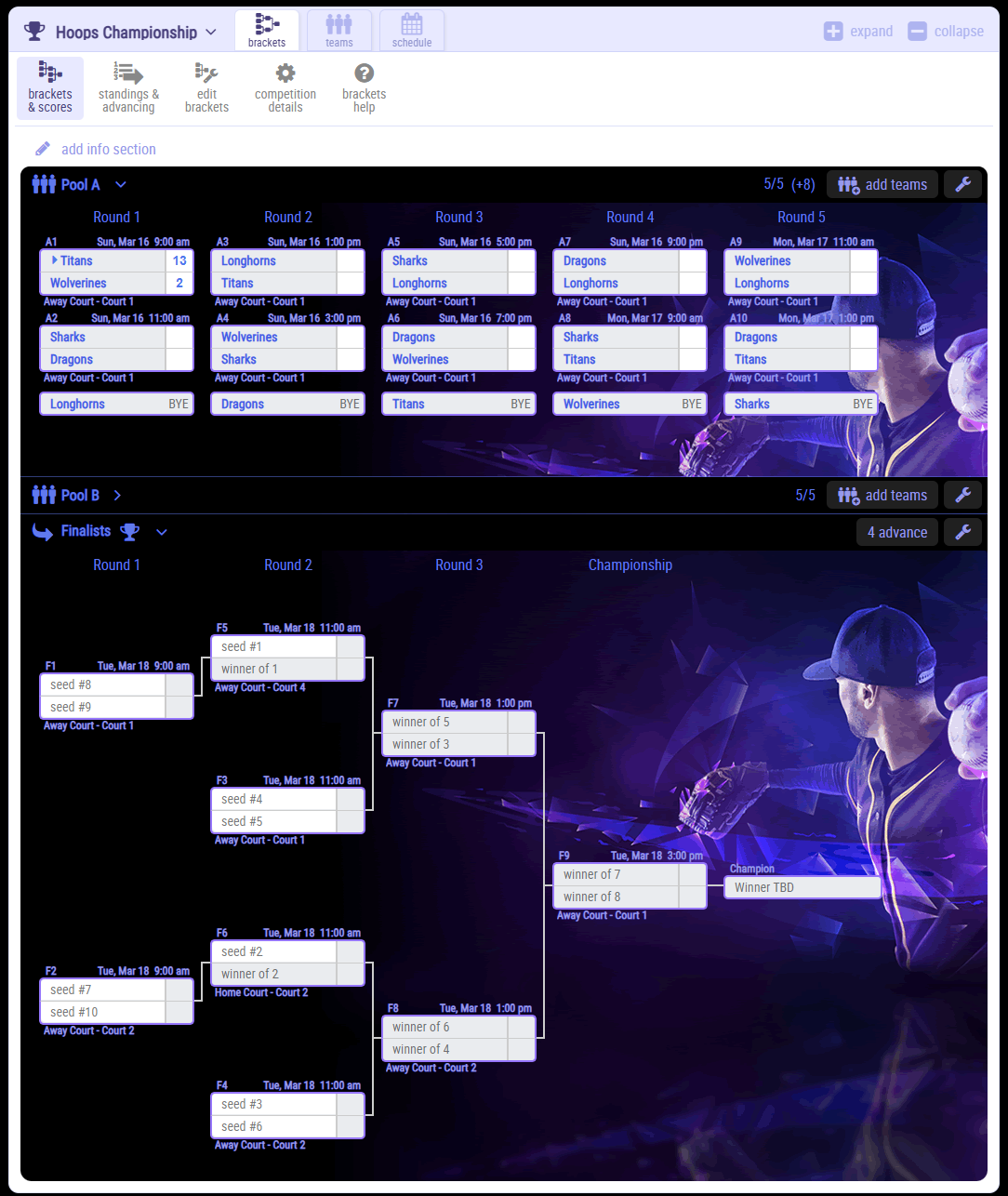
Build and manage any type of bracket — single, double, or round robin.
Combine brackets, set advancing rules, and shift games or rounds instantly as results update in real time.
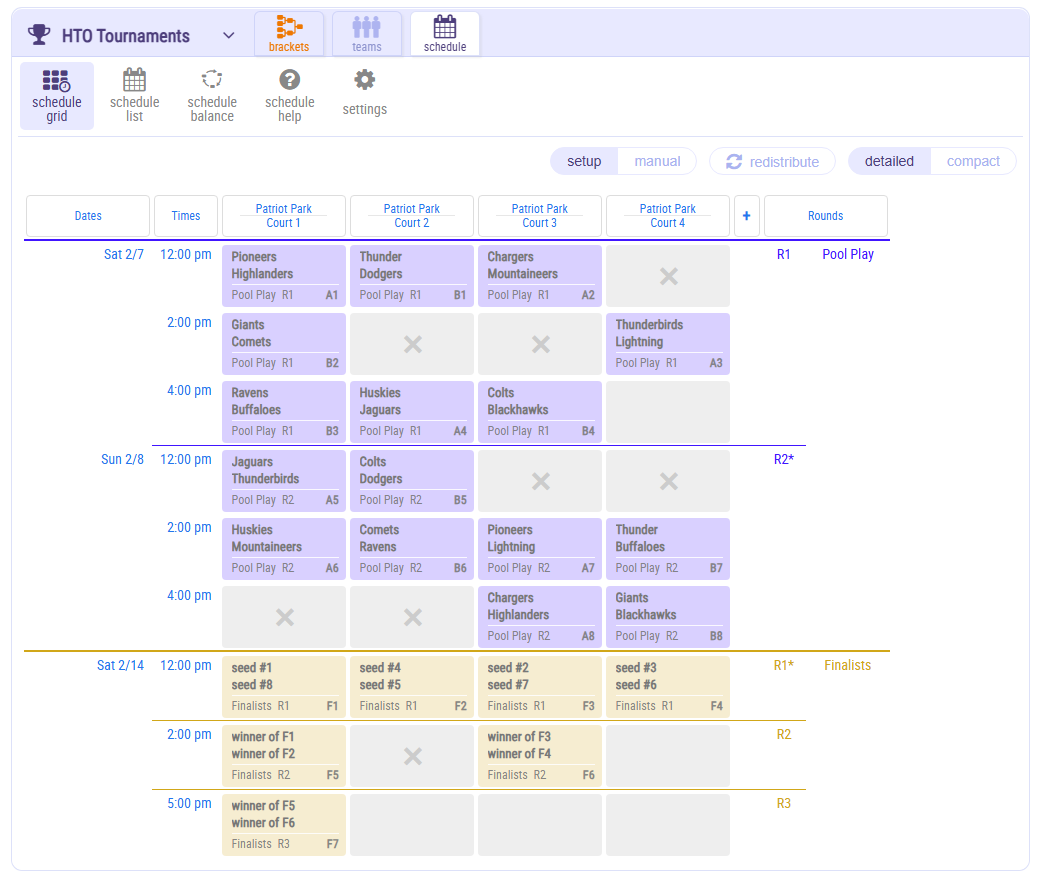
Manage your schedule with ease.
Manage locations & fields, auto-schedule games into time slots, and adjust rounds or stages on the fly.
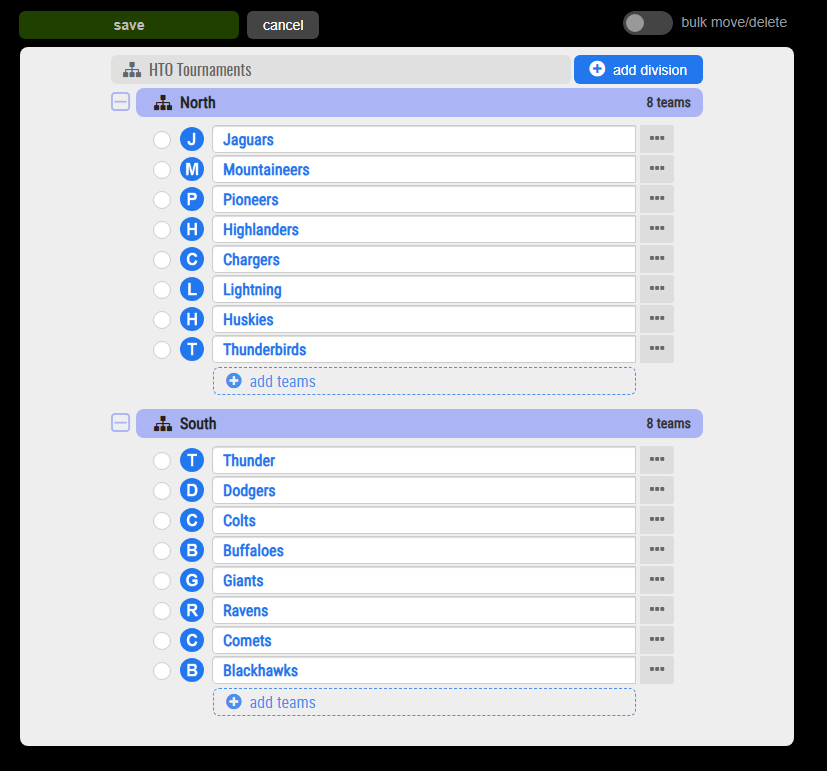
Keep teams, players, and coaches organized.
Manage team staff, organize your rosters, and use powerful messaging tools to easily communicate.
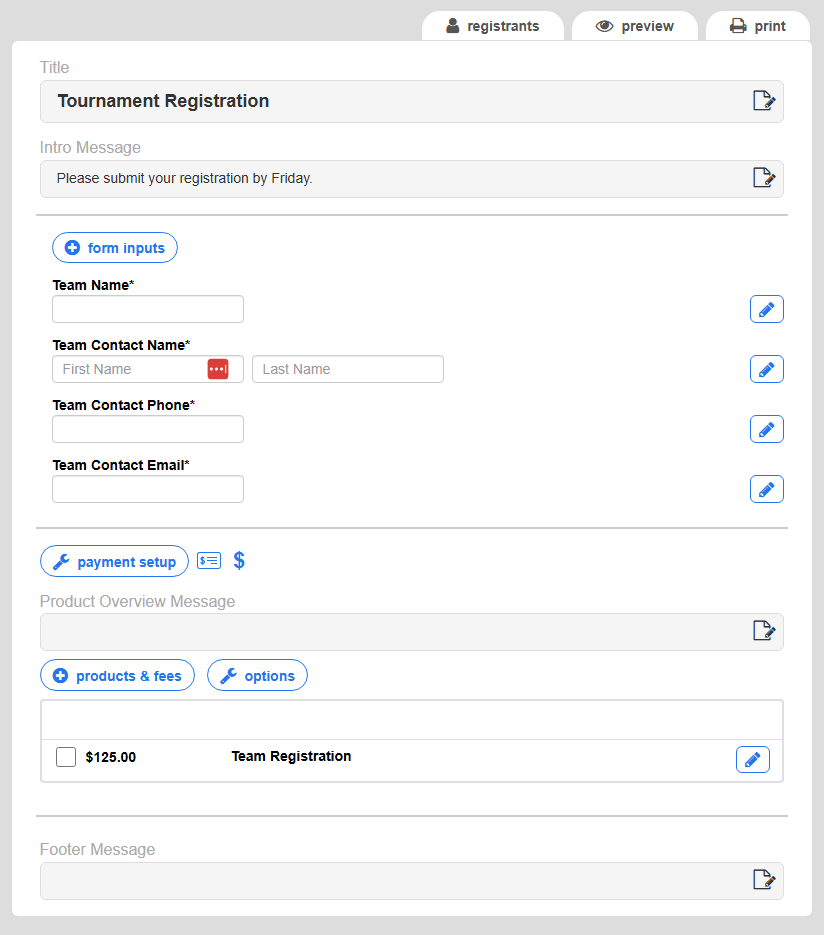
Register teams your way — no extra fees.
Collect team information using custom forms and connect your preferred payment providers such as PayPal, Venmo, Stripe, Autorize.net, or Zelle.
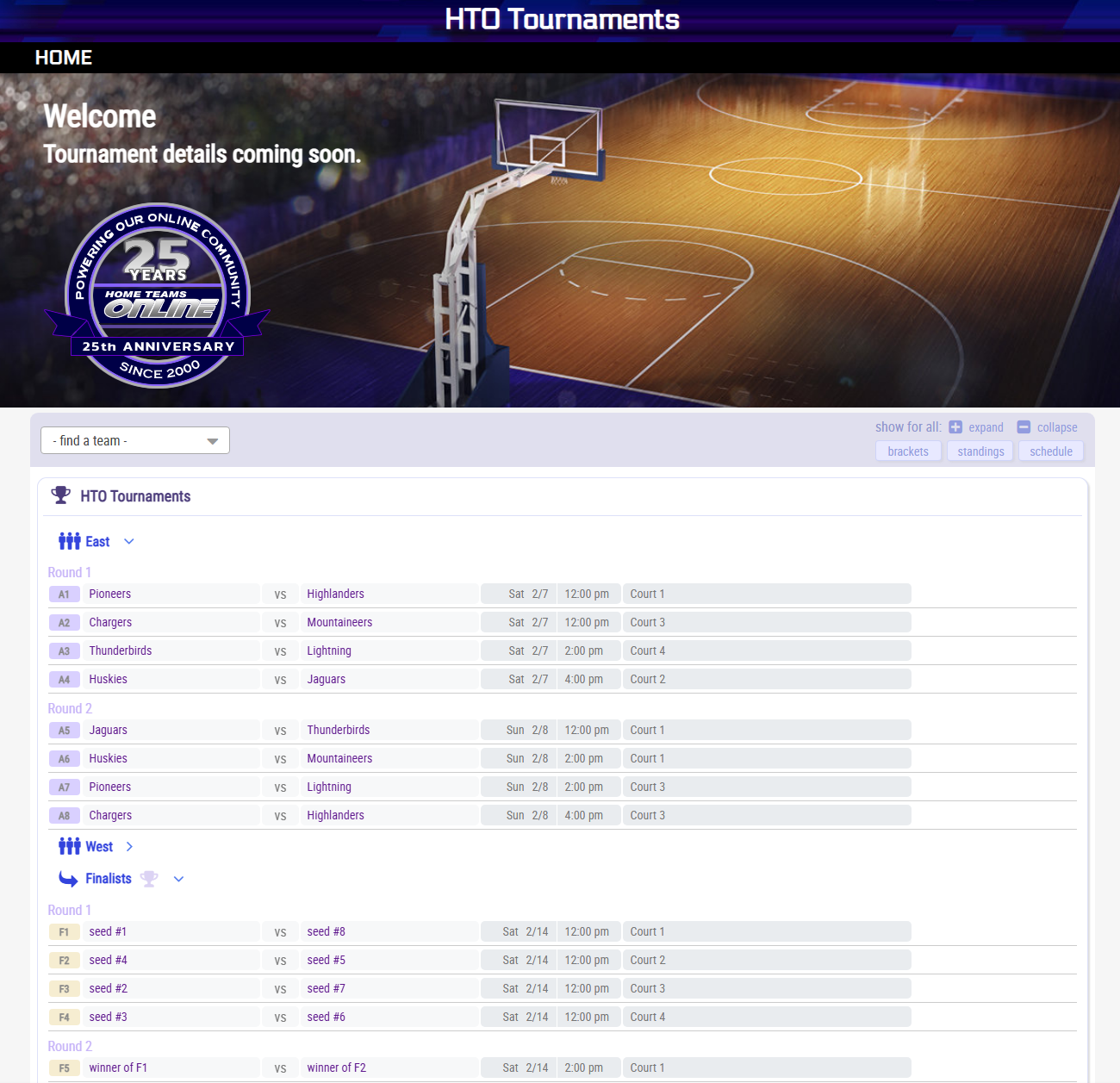
Show off your brackets on a customizable website.
Connect HTOTournaments to a customizable website to show off your brackets.

What our customers are saying about HTO

HTOtournaments tournament management software

Who is HomeTeamsONLINE, and what is HTOtournaments?

HomeTeamsONLINE has provided websites for regional organizations with hundreds of teams across multiple leagues since December 2000, over 25 years.

Those organizations ran massive tournaments on their own custom spreadsheets, leaning on decades of experience and long hours to keep everything running smoothly.

HTOtournaments was built to meet their needs, and to let smaller and less experienced clubs set up a tournament like a pro.

HomeTeamsONLINE, 25 years of sports websites and tournament software

How is a tournament organized?

Your HTOtournaments site begins with your first event, and everything nests inside it.

 Organization HomepageYour public page listing the tournament events you have coming up. Visitors start here and pick their event.
 Tournament EventThe whole tournament, for example your Fall Classic. An event awards several trophies, one per competition. Create one from Add-Edit Events.
 CompetitionA group that competes for one trophy, usually a division or age group such as Boys 14U.
An event can hold many competitions.
 BracketA Competition can have one or many brackets: round robin, match play, pool play, single elimination, double elimination, and custom brackets you build yourself.
 Teams and PoolsThe teams in a competition, and Pools if you split them into groups. Teams can be made available for the Competition, and then assigned to a bracket slot.
  Advance to the next stageA competition can run in stages. We use the term rounds for matches within a bracket, while a Stage is a new bracket. You can set up advancing rules, and you can override the advancing teams before you finalize which ones advance.
  Advance to the finalsThe last stage, where the qualifying teams play for the championship.

Full detail is in Events and Competitions.

What sports can I run a tournament for?
  • Baseball
  • Softball
  • Basketball
  • Lacrosse
  • Hockey
  • Soccer
  • Football
  • Volleyball
  • ...or any competitive sport

Your sport sets the wording

  • Where games are played is named to match your sport: field, court, rink, table, gym, room, ring, mat, track, pool, alley or lane.
  • So a volleyball event says Court 3 and a soccer event says Field 3, without you setting anything up.
What do I need to plan and manage a tournament?

The pieces, roughly in the order they matter.

Venue

  • How many courts or fields you have, and for how many hours.
  • Courts multiplied by hours, divided by game length, gives your capacity.
  • Four courts for eight hours at a ninety minute turnaround is about twenty games a day.

Teams

  • How many, and in how many divisions.
  • Whether they are committed or just interested.

Format

  • Pool play, elimination, or qualifying rounds feeding a main bracket.
  • Driven by your team count and the hours you booked.

Registration and people

  • How teams enter, what they send you, and how they pay.
  • Contact information and staff management, all in the same system.

Schedule

  • Games against time slots against playing areas, with the conflicts visible.

Communication

  • One place people check for the current schedule.
  • A way to reach everyone the moment something moves.
What else goes into running a tournament?

These are your calls to make, not ours. What the software does is give you somewhere to work them out and keep track of them.

Which format fits my team countRound robin, match play, pool play, single elimination, double elimination, or a custom bracket you lay out yourself. Build more than one version and compare them side by side. Team credits are only spent when you assign a team to a slot, so trying formats costs nothing.
How far ahead to startCreate the event and block out its brackets as soon as your dates look likely. Nothing is committed until teams go into slots, and several events can sit in the system at once.
How long to book the venue forYour playing areas multiplied by your available hours, divided by game length, is your capacity. Work that out in the schedule before you call the venue, so you know how many hours and how many courts to ask for.
How to seedYou set the seeding order. Fill the slots in bulk or one at a time, and move a team between slots at any point. When a stage ends you can override which teams advance before you finalize it.
What staff I need on siteDefine your own roles, for example scorekeepers, officials and check-in, and assign them to individual games on the schedule. The schedule also shows how many games run at once, which is what sets how many people you need.
Entry fees, and who has paidRegistration packages carry the cost. The registrant list shows the payment status for each entry and exports to CSV. Take payment by PayPal, Stripe, Authorize.Net, Venmo, Zelle or a mailed check.
What to ask for on the formBuild the form your event actually needs, and collect waivers, birth certificates and proof of age on that same form.
Liability paperworkWaivers and any other document you require are collected and stored against the registration. What you need to require is between you, your association and your insurer.
What is the first thing I need to run a tournament?

Three things, and they come in this order.

Venue

  • It sets your limits before anything else does.
  • Courts multiplied by hours, divided by game length, gives your capacity.
  • Four courts for eight hours at a ninety minute turnaround is about twenty games a day.

Staff

  • Officials, scorekeepers and whoever runs check-in.
  • You cannot run more games at once than you have people to officiate.

Registration

  • Open it once your dates and venue are confirmed, not while they are still being discussed.
Can I set up a tournament before my teams and fields are confirmed?

Yes, and this is the part most people do not expect. You can build a complete tournament event before you assign a single team.

  • There is no cost until you actually start assigning teams to their bracket slots.
  • So you can experiment freely, and build different versions of your brackets for different contingencies.
  • Block out your structure early and fill in the names as entries confirm.

That matters because your team count is never final until close to the day. Planning around a number you do not have yet is the normal case, not the exception.

How do I set up brackets, and what types are used?

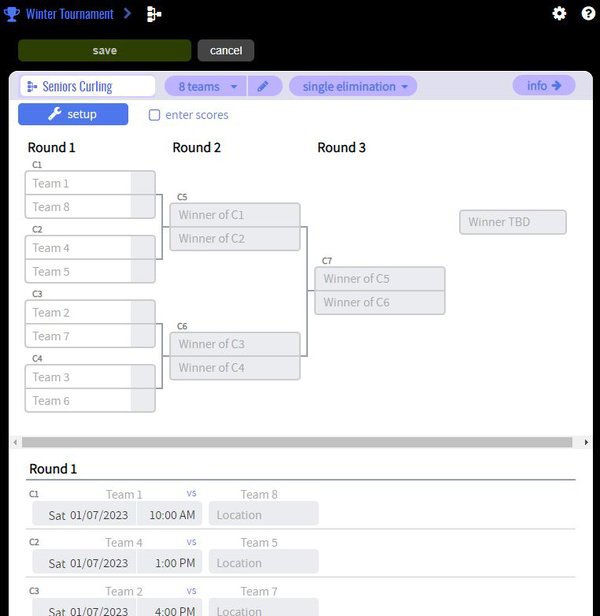
Setting up a tournament bracket with format, pools and number of teams

Four formats cover almost every tournament.

  • Round robin. Everyone plays everyone.
  • Single elimination. Lose once and you are out.
  • Double elimination. Two losses to go out, and a popular choice because it keeps teams playing.
  • Custom. Build the bracket yourself when your event does not fit a standard shape.

Pool play can feed a final bracket. Split your teams into pools, play round robin inside each, and advance the top finishers into an elimination bracket.

What if I need a custom bracket?

Most tournament organizers style their games so the top match-ups are the final games, on the best fields. Control over that detail is what separates a planned tournament from a generated one.

  • Lay out the rounds and match-ups you actually want.
  • Put your marquee games in the slots and on the fields that suit them.
  • Run a special format your event has always used.
Can I control which teams play each other, and when?

Yes. Most tournament organizers style their games so the top match-ups are the final games, on the best fields.

  • Set the order of your rounds and which match-up sits in which slot.
  • Hold your best game until last rather than losing half your draw on Saturday morning.
  • Move an individual match so a local rivalry lands in a better slot.
  • Teams travelling a long way can start later.
What about multi-stage brackets and qualifying rounds?

Many tournaments run qualifying match-ups first, to evaluate skill level before assigning teams to the main bracket.

  • One stage feeds the next, and you accept the qualifying teams into it when the stage is done.
  • Qualifying sorts the field so the main bracket is seeded on what you saw, not on what you guessed.
  • Only the starting brackets use team credits, so later stages cost you nothing.
How do I manage scheduling for dozens or hundreds of teams?

Not by hand. At thirty teams it is tedious, and at a hundred it is not possible to keep straight.

  • Set your playing areas, your dates and your start times, and let the schedule build itself.
  • Every match in your brackets already exists, so the builder is placing games you have rather than inventing new ones.
  • Quick fill takes your first game time, how long a game runs and the gap between games, and lays out the whole day across every playing area at once.
  • Adjust by hand afterwards. Move one game and the grid works around it.

Review Schedule

  • Every competition on one timeline, so any conflict shows up immediately and you can adjust.
  • Shift entire brackets, or just certain rounds, to new times, and confirm no conflicts will occur.
How do I manage venues and playing fields?

Enter your venue and its playing areas, and every game on the schedule carries the location with it.

  • The location gives the address and driving directions, and links to a mapping system such as Google Maps automatically.
  • The sub-locations, or playing areas, are listed under it: the individual courts, fields, rinks, tables or diamonds. Each one can carry its own description of where it is, for example "Courts 3 and 4 are on the second floor".
  • Or leave it open. If your sport just uses whatever court is free, you do not have to track the playing area in detail.
How do I give directions to the venue?

Put the address on the venue itself and every game on the schedule carries it.

  • Entering the address links the venue to a mapping system such as Google Maps automatically.
  • A parent taps the game and gets driving directions.
  • Parking, entrances, hotels and door times can hang off the venue too.
What happens with rain delays or schedule changes?

Changes are made as a unit rather than game by game.

  • Move a whole bracket back a few hours in one move.
  • Fix the start day for a particular round.
  • Update a delay that affects the entire tournament at any point.

Everyone then has the latest times and playing fields, because the website, the embedded brackets and anyone looking at their phone all read from the same schedule.

How do I avoid schedule conflicts?

The schedule review screen lays the whole event out on one master schedule, with conflicts shown immediately.

  • See every game across every playing area in one view.
  • Catch a team booked twice, or a field double-booked, before anyone travels.
  • Check how heavily each playing area is used across the day.
What do I need for registration?

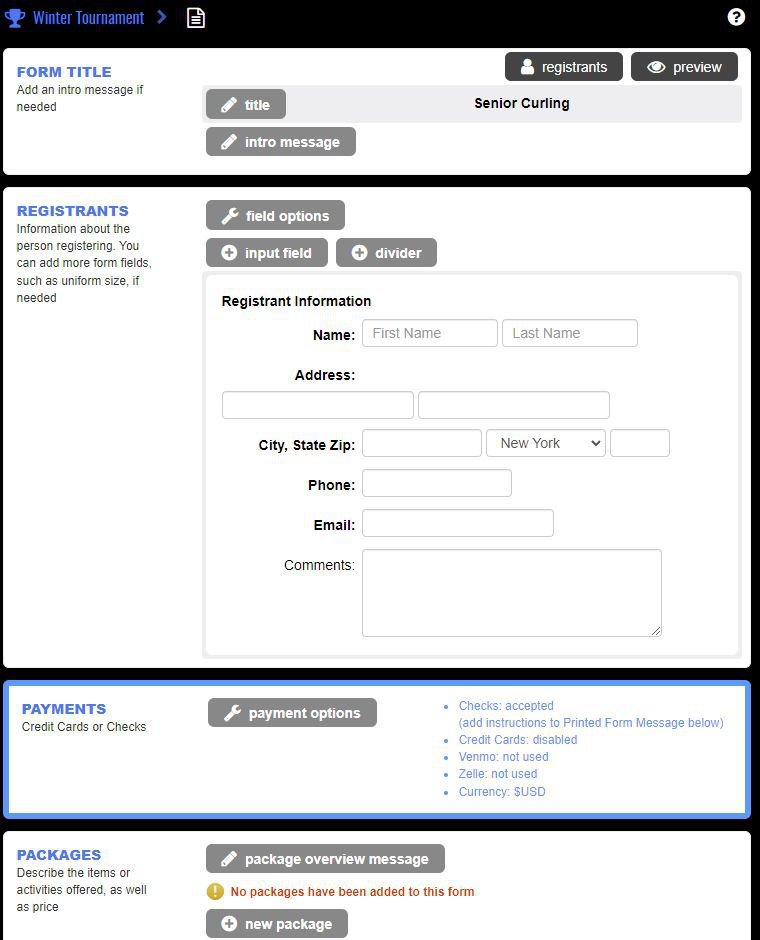
Tournament registration form editor with fields, documents and payment options

Registration, contact information and staff management are integrated, so entries feed the tournament instead of becoming a separate spreadsheet.

  • Build your own forms and ask for what your event actually needs.
  • Collect documents on the same form, including waivers, birth certificates and proof of age.
  • Take payment by PayPal, Stripe, Authorize.Net, Venmo, Zelle or a mailed check.
  • HomeTeamsONLINE adds no transaction fee.
  • Registered teams can be added to the right division automatically.
What if teams change at the last minute?

The system is built for it. Late changes are the normal condition of a tournament, not a failure state.

  • Swap teams in and out of slots at any point.
  • Add write-in teams at the last minute.
  • Swap playing fields as availability changes.

You can also leave bracket sizes open, so the structure absorbs whatever your final participation turns out to be, including no-shows and late withdrawals.

What if I have more teams than my plan allows?

Your event still runs. Slots you have not filled keep their seed number as a placeholder, and the brackets, schedule and scoring all work around them.

  • Team credits are what you spend to put a named team into a slot.
  • Every plan includes an allotment, and Rookie, the free one, includes credits too.
  • Archive a finished event and its credits come back for the next one.
How do teams advance to the next bracket or stage?

Within a bracket the winner moves to the next round as soon as you enter the score. Moving teams from one stage to the next is yours to review and accept.

  • Choose how many advance out of each pool or stage.
  • Tie breakers are fully customizable, so you can match whatever your league or association already uses.
  • Standings calculate themselves from the scores you enter, and update as each match finishes.
What about consolation games?

A consolation bracket keeps teams playing after they go out of the main draw.

  • By the end of a tournament your playing areas start freeing up, so the time is already there.
  • Teams that travelled a long way get more than two games out of the weekend.
  • If you advertise a guaranteed number of games, this is how you deliver it.
How do I get the word out?

One link. Your tournament website carries the brackets, schedule and scores as you build them, so the link you hand out on day one is still correct on day three.

  • That solves the real problem, which is not announcing the event. It is that the schedule people screenshot on Tuesday is wrong by Saturday.
  • Message teams, staff and families by text or email from one place.
  • The same contact list covers promoting the event beforehand and running it on the day.
Do I get a website for my tournament?

Every event gets its own website, built on the same website engine that runs HomeTeamsONLINE sites, so the advanced website features are all available to you.

  • Brackets, schedule and scores appear on it as you build them.
  • Your organization also gets a free event director page, so people can easily find whichever event they are looking for.
  • Add your colors, logo and banner, plus pages for directions, rules, hotels and sponsors.
Can I embed the tournament into my own website?

Yes, on any third party site that allows embed code. It is the same mechanism sites already use for video and payment buttons.

  • The tournament module is searchable by event, by competition and by team.
  • Visitors find their own team quickly and see its bracket and schedule.
  • It updates as you enter scores, so there is nothing to re-paste.
Can I run recurring or multiple tournaments?

Yes. Create tournament events as you need them and queue them up well in advance.

  • Spring, summer and fall events can all sit in the system at once.
  • Start preparing a later event while an earlier one is still running.
  • Each event keeps its own brackets, schedule, teams and website.